How To Set-up Individual Device Health Alerts
The video and instructions below will show how to select settings for your health alerts for one specific device. These will notify you of any issues with your device such as, low battery, an unplugged or offline device.
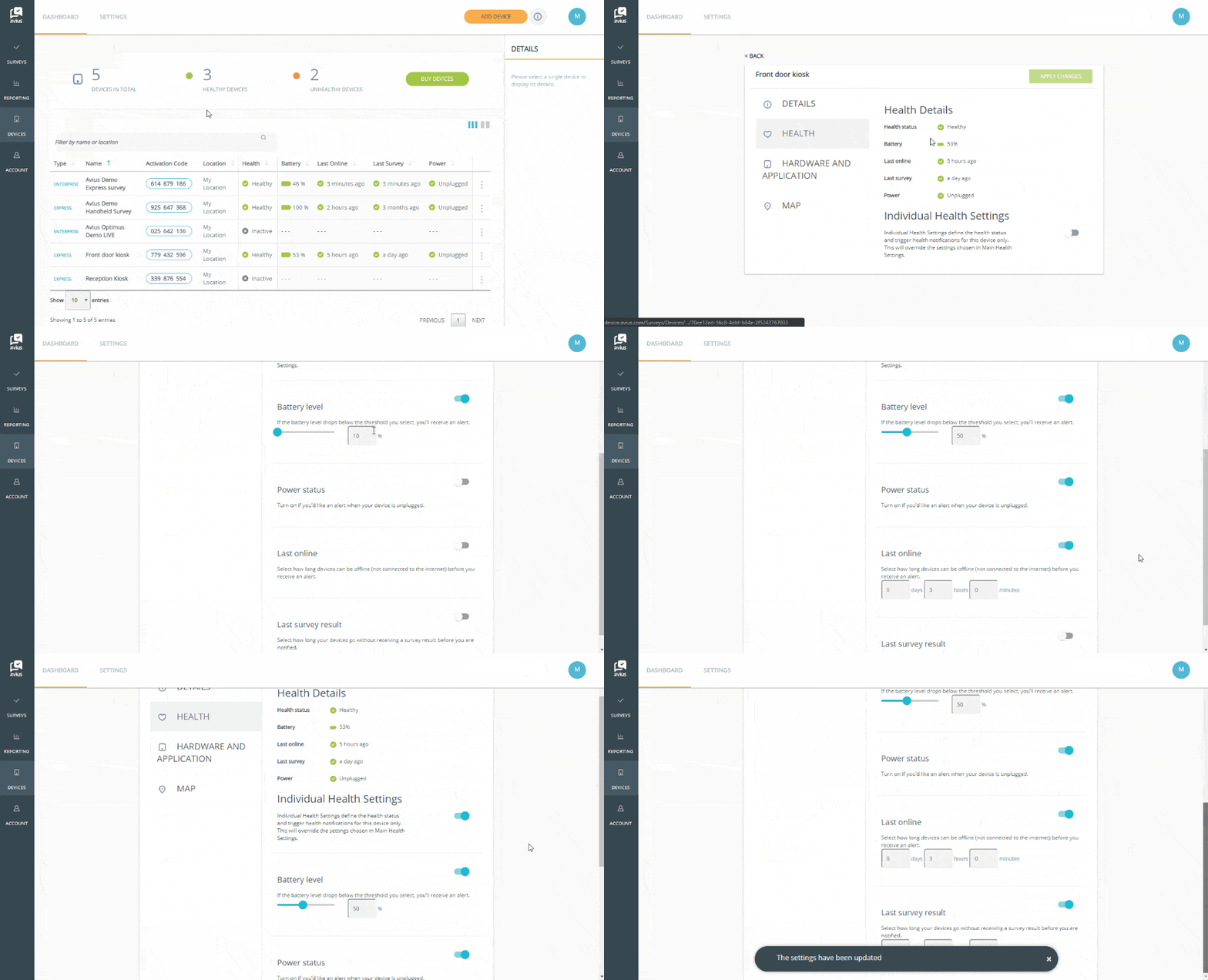
Loginto Avius Surveys and click on Device in the left-hand menu to see your list of devices.
- Open the device you’d like to set-up an alerts for, click on the 3 dots to the right and click edit/view, or double click the row.
- Click on Health in the menu on the left of the white panel.
- Turn Individual Health Settings toggle on, (this will override general health settings).
- Set a level for Battery Level and turn the toggle on.
- If you’d like an alert if your device is unplugged, switch Power Status on.
- Enter how long a device can be offline before you receive an alert, and turn the toggle on.
- Select how long your device can go without receiving a survey result before you receive an alert, and turn the toggle on.
- Click the green Apply Changes button at the top of the page.
You will then need to set who should received the alerts, seeCreate and Edit Custom Alerts.