Select Health Settings & Set-up Alerts
The video and instructions below will help you set device Health Settings and create alerts if any devices fall below the settings selected. These settings are for all of your devices, if you’d like different settings for specific devices seeIndividual Device Health Alerts.
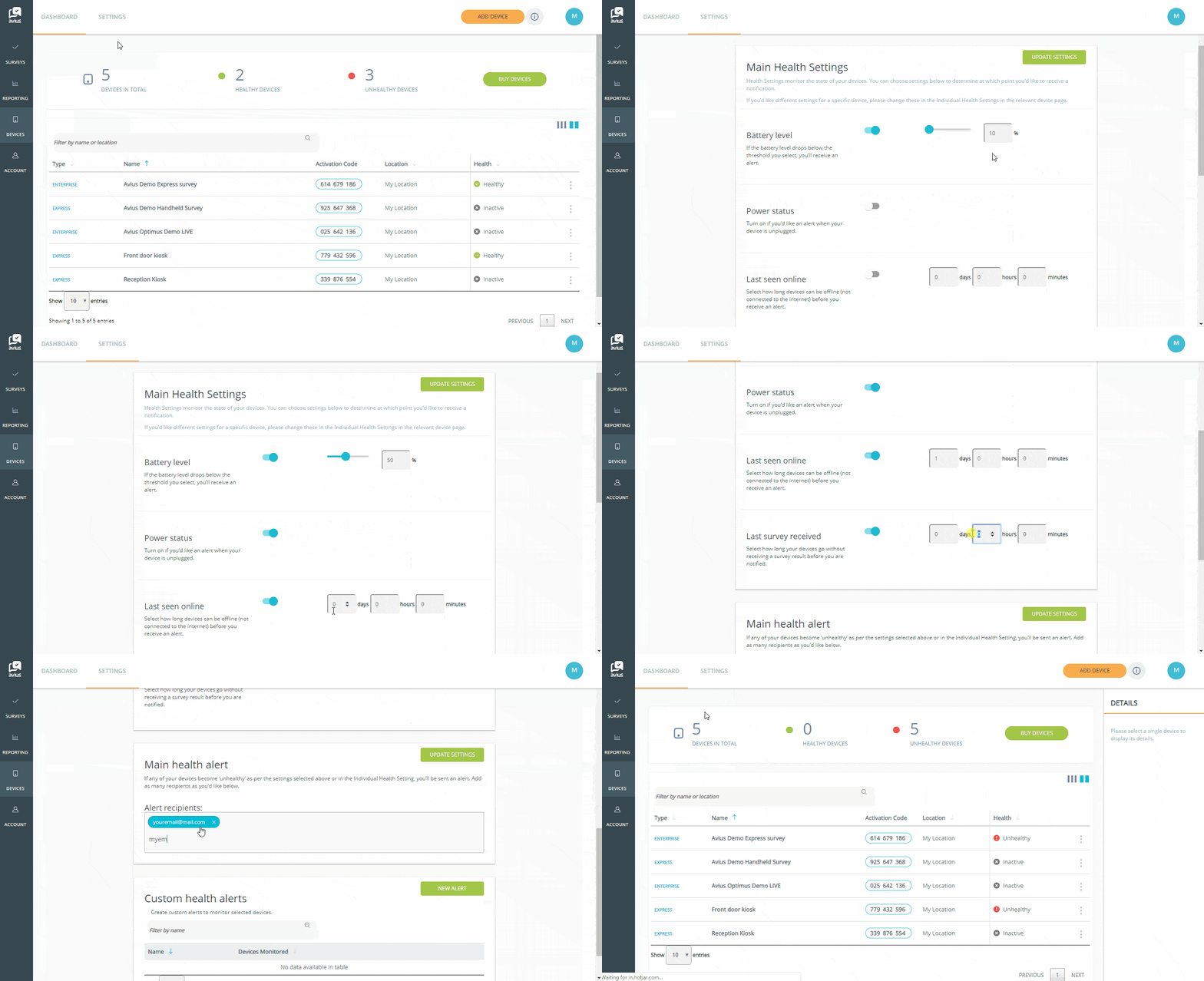
First, login to Avius Surveys, then click on Device in the left-hand menu.
- Click on the Settings tab in the top menu.
- Go to Main Health Settings.
- Choose Battery Level and switch on.
- Decide what point you’d like to receive an alert and for which settings.
- Set a level for Battery Level and turn the toggle on.
- If you’d like an alert if your device is unplugged, switch Power Status on.
- Enter how long a device can be offline before you receive an alert, and turn the toggle on.
- Select how long your device can go without receiving a survey result before you receive an alert, and turn the toggle on.
- Scroll down to Main Health Alerts, enter the email addresses of all people who need to receive alerts, press enter after each address. Then click the green Update Settings button.
- You can change any of these settings at any time.